
Standard quotes
The quotes you make many times (the server for a small business, the entry-level gaming PC, the POS with drawer and scanner) saved without a customer and in groups, to produce a new one for another customer in a moment and change whatever is needed.
- Technical name
gerp_presupuestos_tipo- Author
- GestioERP · SIAM Cloud
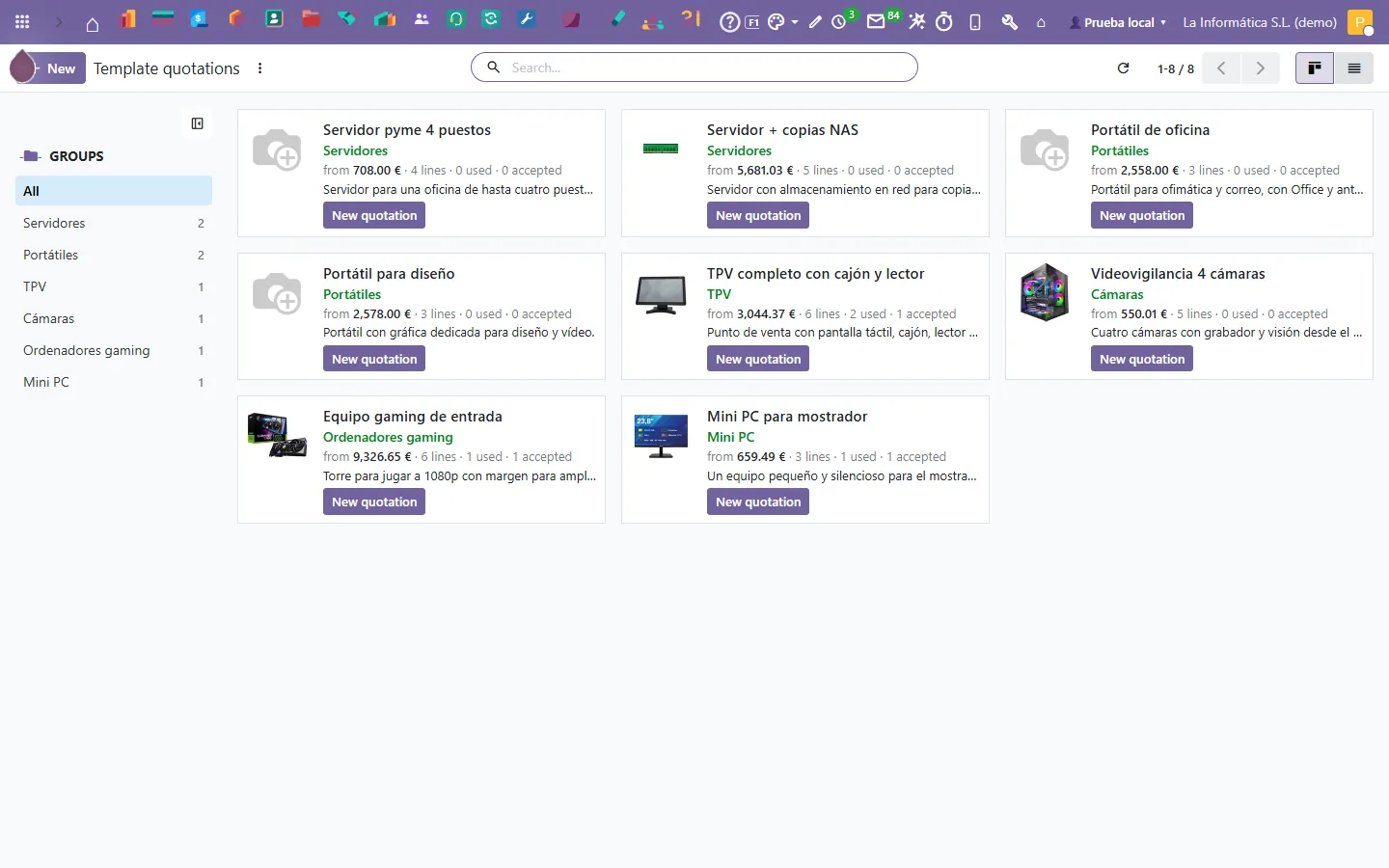
Where everything is
Sales › Standard quotes: the cards of the types, with the photo, the group, «from» how much, how many lines it has, how many times it has been used and how many of those quotes were accepted. On the left, the groups to filter; at the top, the search box (name, group, description or product). Sales › Standard quote groups: the groups (Servers, Laptops, POS, Cameras…) with their order and icon.
Save a quote as a template
From the list, New: name, group, description, photo and the lines (products, sections and free lines such as labor or installation). Or from a quote that turned out well: ⚙ Actions › Save as template. The lines are saved with their price and discount; the customer and the date are not, because they are decided each time.
Create a new quote
On the card or in the type's record, New quote: you choose the customer and the date and the quote opens already made, with all its lines. Then you change whatever you want, as in any quote. Also in a new quote, choosing the type in the Quote template field.
Live or fixed prices
With Live prices (the default) each line with a product takes today's price and the customer's price list, as if you entered the product by hand; free lines keep their price. Without live prices (fixed), all lines come out with the price and discount they had when saved, and you can see and change them in the record. If any product has changed price since it was saved, the type warns you («N precios han cambiado») and the button Poner los precios de hoy updates them.
Know what is sold
Each quote remembers which type it came from. The «used / accepted» button on the record opens the quotes that came from that type, and the card says how many were accepted: after a while you know which configurations sell and which do not.
Careful
A group with types inside is not deleted: first move the types to another group. An archived type does not appear when choosing a template, but it is kept with its statistics. For internal users, the permission is Sales › Standard quotes.
Questions
- How do I save a quotation to reuse it?
- In Sales › Standard quotes, New, or from an existing quotation: ⚙ Actions › Save as template. It is saved without a customer, with its lines, prices and discounts.
- How do I make a quote from a template?
- In Sales › Standard quotes, click New quotation on the card, choose the customer and the date, and the quotation opens with all its lines.
- What are live prices?
- With live prices each product uses today's price and the customer's pricelist; with fixed prices, the saved price and discount. Set today's prices updates them.
- How do I create a group of standard quotes?
- In Sales › Standard quote groups: add a line with the name, order and icon. A group with quotes inside cannot be deleted.
- How many times was a template used?
- Each card shows how many times the template was used and how many were accepted. The «used / accepted» button opens those quotations.
- Can I add a picture to a template?
- Yes: in the template form, top right. Without one, the picture of the first product with a picture is shown.
- How do I find a template?
- In Sales › Standard quotes, search by name, group, description or product; the groups on the left filter the list.
- Is the customer saved in the template?
- No: the lines are saved with quantity, price and discount. The customer and date are chosen each time.