
TimeTracker (time control)
Clock in, breaks and out from the computer, the phone or a kiosk with PIN or QR; hours worked against the calendar; absences and holidays; Spanish public holidays; employee documents; sealed clockings with correction and consent, and a PDF time log to sign.
- Technical name
gerp_timetracker- Author
- GestioERP · SIAM Cloud
Clock in
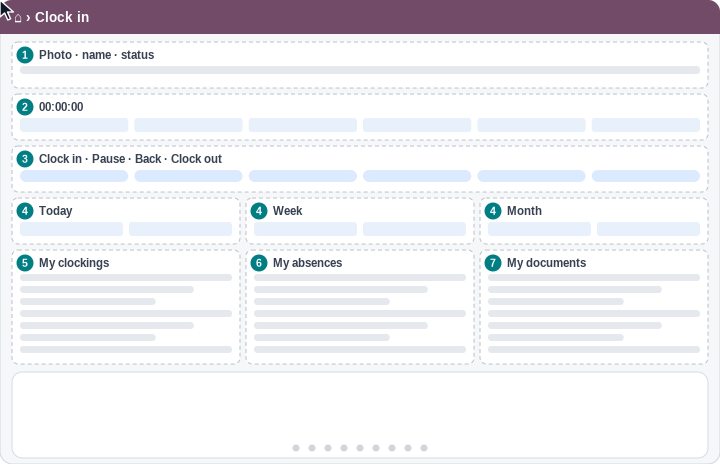
The screen of each worker, on the computer and on the mobile.
- Who clocks in: the employee linked to your internal user.
- The timer of the open clocking (without breaks) or the break time.
- Clock in, break (rest, meal or personal), return and clock out; with location if you tick it.
- Hours worked against those on the calendar (excluding holidays and absences).
- The latest clockings, the month's sign-off and your PDF record.
- Request holidays or an absence and see their status.
- The documents the company lets you see (contract, payslips…).
Time tracking dashboard
Who is working, hours of the month, absences to approve and corrections; tabs for clockings, absences, employees, documents and holidays, and the TimeTracker buttons.
Clockings
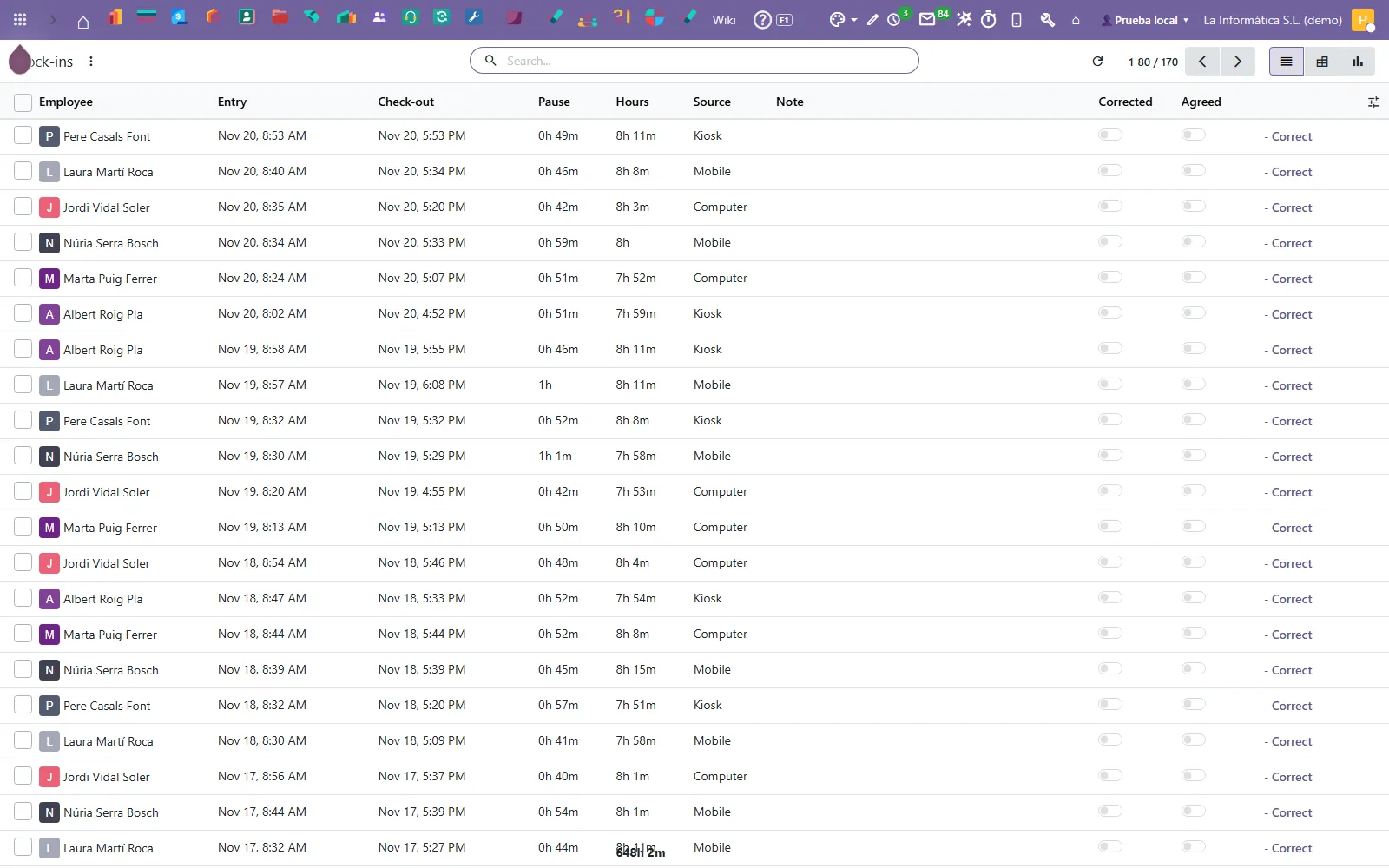
All the clockings with entry, exit, break, hours, source and note; in a pivot table, the hours per employee and month.
Stamp, correction and acceptance
When closed, each clocking is sealed (HMAC-SHA256 chained per employee). A sealed clocking cannot be changed or deleted: it is corrected with a reason and the trail remains. If someone changes the database underneath, it shows in red («the seal does not match»). The worker gives their agreement to each month.
Absences, holidays and public holidays
The absences are Odoo's with GestioERP's concepts (personal, medical, family, legal reasons…). The year's holidays are assigned all at once and Spain's public holidays are loaded by region and municipality.
Reports and time record
Hours per employee for the period against the calendar and the PDF time record to sign, which must be kept for four years.
Permissions
In Internal users: «Clock in (yourself)» for all workers; «TimeTracker» to see everyone; «Manage» to correct, approve absences and configure; and each button on the dashboard.
Questions
- How do I clock in?
- TimeTracker › Clock in: «Clock in» starts the timer; «Pause» and «Back to work» for breaks, and «Clock out» when you finish. The same screen works on the phone.
- How do I take a break?
- In Clock in, choose the type (rest, lunch or personal) and press «Pause»; when you return, «Back to work». Breaks are deducted from the worked hours.
- Can I clock in from my phone?
- Yes: open GestioERP on your phone, identify yourself and open TimeTracker › Clock in. If you tick «Send my location», clock in and out store where you were.
- How does the kiosk work?
- TimeTracker › Kiosk opens the Odoo kiosk: each person clocks in with their PIN or by showing the QR on their badge (button «Badge with QR» on the employee form).
- How do I correct an attendance?
- Closed attendances are sealed (Spanish working time record): open it and press «Rectify», enter the right times and the reason. Everything stays in Rectifications.
- How do I request holidays?
- In Clock in › My absences › «Request»: the reason, from and to. It stays pending approval.
- How do I load public holidays?
- TimeTracker › Configuration › Load Spanish holidays: the year, the region and the town.
- How do I get the time record?
- TimeTracker › Time record (PDF): choose the month and the employees; one page per worker with signatures.